
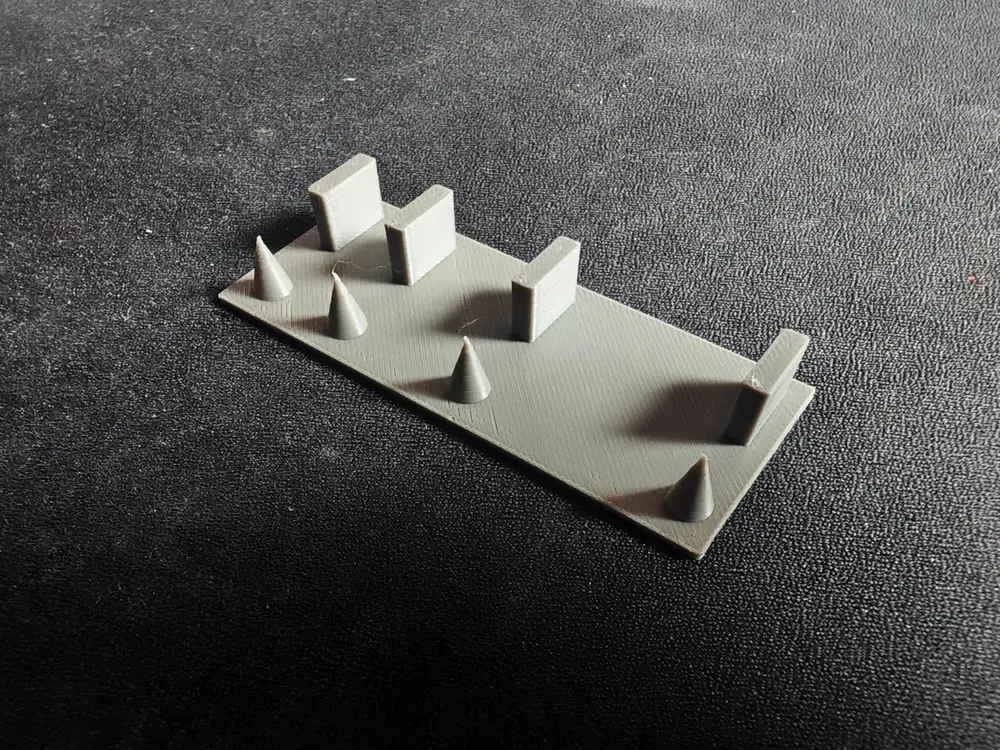
Retraction Test Calibration | Test de calibracion de Retracciones


Helloooooooooo | Holaaaaaaaaaaaaaaaa :D
(please, read it carefully before hit and print | leer detalladamente antes de imprimir directamente)
Why this test and not the one by default on the slicer? | Porque este test y no el que viene por defecto en el slicer?
Nice question. The answer is, the default test isn't enough. Its too small, the both towers are at the same distance (very small gap) and the circles are the same size so we are not covering here all the situations. The default test could show great values but on a higher distance between objects or different sizes are not showed with the default test. This one has on mind differents sizes between objects but also higher gaps.
Buena pregunta. La respuesta es, el test por defecto no es suficiente. Es muy pequeño, ambas torres estan a la misma distancia (una distancia bastante pequeña) y los circulos son del mismo tamaño por lo que no estamos cubriendo todas las situaciones. El test por defecto puede mostrarte valores correctos pero entre objetos que tengan mas distancia entre si o distintos tamaños pueden no verse en el test por defecto.
Este se hizo teniendo en cuenta para cubrir distintos tamaños entre objetos pero tambien distintas distancias
and yes, you can scale it up if you want and also add infill | Si, puedes escalarlo si quieres y añadir relleno*
*this test says 0 infill just to save material, below shows and says 0 infill but you can add infill and whatever pattern you use and like it | Este test dice 0 relleno solo para ahorrar matereial, debajo muestro y dice 0 de relleno pero puedes añadir el relleno y patron que quieras y uses
How it works? what i need to do?
its.. kinda easy, just download the model, put infill to 0%, select your standart profile and hit print.
If test is okay and there's no stringing, repeat but before printing, go to your printer config
and lower by 0.2 the retraction lenght
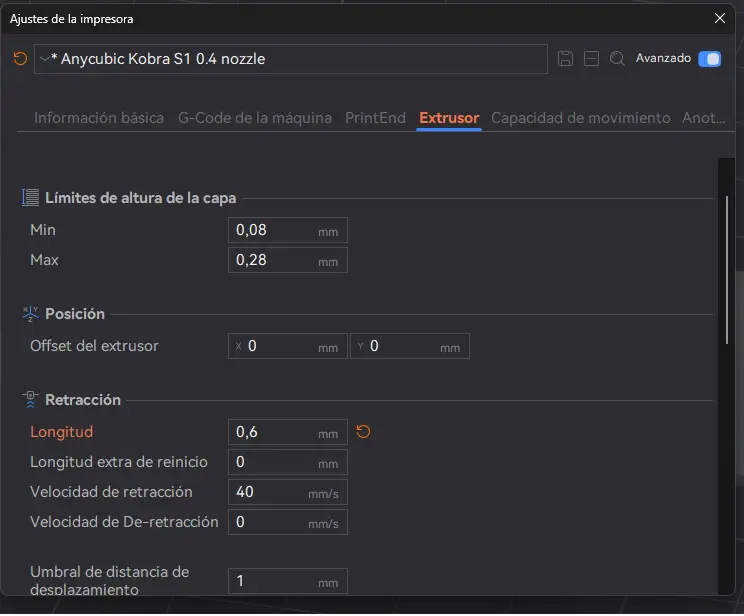
After that, print again and repeat same process until you start getting strings.
What i do if after doing the test i get stringins?
welp, just take the previous value and calibration done and if you got stringins on the first print, increase by 0.2 until they gone.
I've done like 500 prints and still having stringins. what is going on?
dont worry. If after increasing values still having stringings problems is due to another problem. Before wasting more plastic, check this points
- Is the filament dry? if not, is very often to get stringings like this
- Do a tower temp calibration. > Calibration>Tower temp> initial temp always the higher to start on the bottom, this helps to not collapse the tower. on final temp, the lowest temp by default.
- Do a flow test. Could be the culprit here, to much flow can leak
- Do a pressure advance test. If the printer lowers his speed after a high speed, could be a bit of leaking or oozing from the noozle
- Normally this is the last option (in case all of above failed), check the tension screw from the printhead. too tight doesnt let the filament flow, too loose could let to much filament melt and appears the stringings.
SPANISH VERSION
COMO FUNCIONA? QUE TENGO QUE HACER???
Fácil, solo descárgate el modelo, pon el relleno a 0%, selecciona tu perfil estándar o que mas uses y dale a imprimir. Una vez finalizado comprueba que no tengas hilos.
si no tienes hilos, ve a tu configuracion de impresora y bajale por 0.2 la distancia de retraccion. repite el test hasta que empiecen a salir hilos.
QUE HAGO SI DESPUES DEL TEST ME SALEN HILOS????
Tranqui, es normal. Quedate con el valor anterior y ya esta calibrada. no es necesario volver a repetirlo. Si en tu primer test te salen hilos, incrementa por 0.2 el valor y repite el test incrementando si siguen saliendo hilos.
HICE 500 VECES EL TEST Y SIGO CON HILOS. QUE ESTA PASANDO?
Si tras el primer test tienes hilos y varios incrementos en la longitud siguen dandonte hilos, para de iomprimiir para no gastar mas plastico y revisa antes estas opciones
- Seca tu filamento. Estas seguro que está seco el filamento? si tiene humedad suele ser propenso a salir estos hilillos
- Haz un test de temperatura. Calibracion>Temperatura> Tempereatura inicial siempre la mas alta, temperatura final la mas baja por defecto del filamento que uses. asi evitamos que el exceso de temperatura colapse la torre
- Test de flujo. Un exceso de flujo a veces da fugas de filamento dando lugar a estos odiosos hilos
- Test de presion lineal. Que vaya rapido y luego lento puede dejar inconsistencia en la extrusion si no se calibra bien, lo cual puede generar estos hilos.
- Revisa el tornillo del extrusor. (Esto es en caso de quee todo lo anterior no haya servido) Revisa que el tornillo este ni muy apretado ni muy flojo. Si esta muy apretado puede no empujar bien y si esta muy suelto puede fluir demasiado filamento.
